
Any Software is only as good as the support it comes with. All good software will always merit excellent first-rated support; and that is what you have with PDF-eXPLODE. When you have an issue or a "how-do-I-do-this" question, you will get a precise and accurate response within the shortest possible time; sometimes within 1 hour but never over 24 hours. Ask our Users.
"The best customer service - if you're in the US and concerned about doing business with an Australian company don't be. You couldn't find a company anywhere with service as good as Mark offers"
Connie Staley : Port Of Olympia, Olympia, WA, USA
"Can’t say enough positives about the product, company and particularly Mark Fonseca; simply put, a perfect 10!"
Andy Hopkins : Wayland, Massachusetts, USA
"As a user of PDF-eXPLODE for many years, I can honestly say that it does exactly what it says on the tin. It has saved hours of work or meant that jobs could go ahead that otherwise would have been dropped. In addition the support and advice from Mark is gold standard."
Steve Coates : Snr Officer, New Zealand Educational Institute, NZ
"PDF-eXPLODE is an excellent piece of software. I would certainly recommend it to others on the basis that it does what it is supposed to, is very configurable and the support in the initial set-up and learning curve is second to none. Allowing for the time difference,
every e-mail I have sent – and there have been quite few – has always been answered straight away with good sound advice. Other suppliers I have dealt with sometimes take days to respond to a support call."
Roger Cann : AllPay.Net, UK
For those with a Priority Support Plan license or during evaluation or the first 60 days after purchase, if you have any difficulties, errors or bugs when running PDF-eXPLODE, you can forward those issues with as much detail as possible to: support@3000AD.com.au. E-mails are generally responded to within 24 hours .
All bugs can be reported (regardless of support plan license) by email to support@3000ad.com.au providing us with details of how to reproduce the bug and any screenshots.
Effective 15 August 2022, in the absence of a paid support plan, 3000AD Systems will only respond to emails requesting the following services:
• License activation reset for the purpose of re-imaging the disk on which PDF-eXPLODE was installed or moving the license to a different PC.
• Providing a download link of the purchased version of PDF-eXPLODE setup program
• Customer database lookup/update of contact information, license ID and password
• Re-send a copy of an invoice
Any operating support email requests from Monday 15 August 2022 must be covered by an annual support plan or a per incident paid support. No variation to this rule will be entertained.
Where the license is a 'Desktop' or mutiple server Licenses are purchased, then each License at the site, MUST be covered by an annual support. A multiple purchase discount applies for 2 or more annual support payments made in the one order.
If your account is supported by an external IT service, please ensure they are aware of this rule.
This notice also applies to any support or upgrades for PDF-eMONITOR where the license is older than 1 year.
We provide three basic types of support for PDF-eXPLODE processing issues.
During the 45-day evaluation period and the first 60 days after purchase, you are entitled to free priority support. Following that period, free support will consist of the following services only:
This service is charged as an annual fee at the start of annual period. This fee is a fixed amount and once paid there is no other fees or charges to be paid for the year. It is renewable each year. It represents a very economical approach to ensuring your PDF-eXPLODE is running at all times.
Sometimes it is necessary to involve your IT department where the problem(s) relate to a local environment permission. Pricing information is available here: Priority Paid Support.
If you have a current Priority Support Plan or you are within the first 60 days of purchase of a new or version upgraded PDF-eXPLODE license, then on-site support via a 'Support'
web link to your site is available for either fixing or advising on issues or a 'Meeting' link is provided where the product and its features can be demonstrated to meet your requirements.
To purchase a Plan, click here:
https://secure.softwarekey.com/solo/products/Product.aspx?ProductID=209464
Please purchase a plan that matches your license type. Once support has been paid for, if you have an existing processing issue, please contact 3000AD Support and advise them of your PDF-eXPLODE Support License, your version number,
your Windows operating system (e.g.: Win7 / Win8 / Win10 / Win 2008, 2012, 2016, 2019.) and the nature of the problem in detail.
This type of Support is along the lines of 'Pay-As-You-Go' support. Priority support is provided on a per-incident/problem or event basis for a set fee each time you choose to purchase this support. This support is provided for the specific issue you identified and will not include any other past or current issues not previously paid for. Generally, once you have paid for the support, you contact us at support@3000ad.com.au describing your issue in detail. Please quote your Incident license no and wherever possible, attach your pdf-explode.log and any graphics of any on-screen errors.
To make support more affordable to those Users with an occasional issue, we have restructured the available support options available to Users as follows:
This applies to Paid Priority support or Free support during the first 60 days immediately following your purchase.
To purchase an annual support priority plan, click here. For pricing information, click here
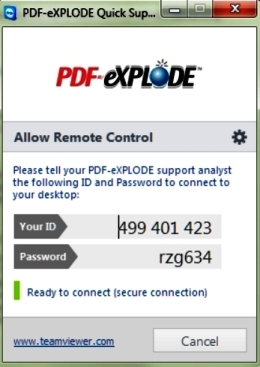
To start a support session on your site with one of our support technicians, Click this  icon to commence the session.
A support executable file, which will allow us to connect to your PC, will commence downloading to your PC. You must run this 18 Mb file and it will then display a DISCLAIMER.
Please read and accept this disclaimer to continue. Next, a support screen displaying a session ID will appear. This session ID is automatically transferred to our network and can be seen by your support analyst within a couple of minutes of you starting the team session.
When your support analyst sees your incoming connection, he will then send you a request to 'Allow' him to connect to your PC to which you must respond in order to start the support session. As easy as that!
icon to commence the session.
A support executable file, which will allow us to connect to your PC, will commence downloading to your PC. You must run this 18 Mb file and it will then display a DISCLAIMER.
Please read and accept this disclaimer to continue. Next, a support screen displaying a session ID will appear. This session ID is automatically transferred to our network and can be seen by your support analyst within a couple of minutes of you starting the team session.
When your support analyst sees your incoming connection, he will then send you a request to 'Allow' him to connect to your PC to which you must respond in order to start the support session. As easy as that!
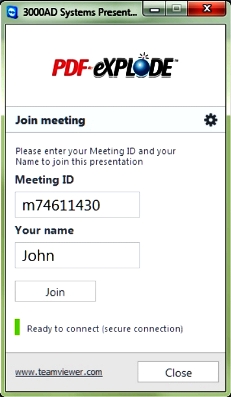
To participate in a pre-arranged PDF-eXPLODE presentation, click here if requested to do so.
A small file will download to your PC. You will need to run this file, and then complete the details requested onscreen as previously advised in your presentation invite.
Once you click join you will be connected to the presentation.

Report (aka Document) Bursting is a feature that runs a report only once yet delivers only selected output to each nominated User of the report based on pre-configured rules, thus greatly reducing the processing load of electronic media and manual human effort while still ensuring data security.
It also increases speed /timeliness of delivery. For example, in the case of say 1000 monthly statements, one ‘report bursting’ run will “burst” or “explode” or “split” into 1000 pages, and each user receives a partial report containing one or more pages, with only the information pertaining to them. Each user thus receives a report personalized with information relevant to them. This report is often output as a PDF format and delivered as an attachment by email or uploaded to a website using FTP or distributed via other delivery methods.
A 1000 page report printed, then manually sorted and mailed, could take up to 2 business days to finalize, but with PDF-eXPLODE and e-mail delivery, this could be completed and archived intelligently on your hard drive in around 1 - 2 hours. What a saving in labor, postage and business time! (this would vary depending on report type, computer processing speed and available RAM).
PDF-eXPLODE gives you the opportunity to download a 45 day evaluation version which can email 25 exploded PDFs per batch run. PDF-eXPLODE also has multiple Server versions, besides the Desktop single user version, to suit your business
Support more PDF-eXPLODE users with less work. Multiple users can share a single instance of PDF-eXPLODE on a PDF-eXPLODE server. Three different server configurations are supported - a different license is available for each configuration:
Create great looking e-mails using HTML. E-mail messages can be formatted using HTML, providing the ability to use fonts and styles, colors, headings, paragraphs, bulleted and number lists, hyperlinks and images. A built-in HTML editor is provided or you may use another HTML editor.
E-mail may be sent through Microsoft Outlook (i.e. a MAPI client), rather than sending through an SMTP server. This allows you to edit e-mails before sending and to save copies in the Sent folder.
Changes in the PDF-eXPLODE architecture improve support for larger and more complex documents with greater speed for exploding and emailing.
A new PDF-eXPLODE specific PDF print engine expands your available functionality like:
If you have created a master PDF with another PDF creator and it includes <pdfexplode> tags, you can drag-and-drop the file onto the PDF-eXPLODE window to explode and e-mail. PDF files using version 1.7 or lower of the PDF format are supported.
You can now automate the process of combining master PDF files so that it is possible to include multiple reports into a single e-mail attachment. Use the command line to automate the process.
Now you have more ways to use cover sheets in your e-mails.
A new E-mail Address Format option allows you to control the format of the e-mail addresses you are sending to, which is useful for sending e-mails to a fax server.
PDF-eXPLODE has a few different options and a widely talked about product support that is second to none
PDF-eXPLODE is available for three server environments. In a server environment, PDF-eXPLODE runs under the SYSTEM account without the computer being logged-in.
Windows Operating System:
DESKTOP: Microsoft Windows XP, Win Vista, Win 7, Win 8/10 (PDF-eXPLODE v4+ only)
SERVERS: Windows 2000, Windows 2003, Win 2008 R2/2012 R2/ 2016 (PDF-eXPLODE v4+ only)
HARD DRIVE: Minimum 40.5MB of free disk space, plus additional space for PDF files created
RAM: At least 64MB of free RAM, more during PDF creation
The following graphic sums up the document or report bursting and delivery process in PDF-eXPLODE:
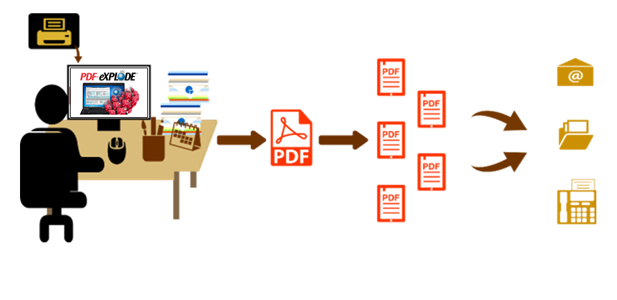
From within your application or Report Writer, click Print, then select the 'PDF-eXPLODE' Printer. Windows processes the output and sends this to the PDF-eXPLODE program for processing
PDF-eXPLODE now creates a PDF (referred to as 'Master PDF') which contains all pages of the output from Windows
This is where the report bursting occurs. PDF-eXPLODE will 'explode' the PDF into multiple PDFs each containing one or more pages based on a hidden "tag" (specially formatted text) in the document
Send burst or exploded PDF documents by E-Mail or FTP (or just archive on your hard disk) with or without additional documents attached (based on rules you define)
It's really as easy as 1-2-3! The set-up on a Desktop version can take as little as 1 hour to be fully up and running.
The following table will assist you in calculating the potential savings you can make by converting to electronic delivery from a current paper driven Invoice and remittance trail. You will save on postage, printing inks, stationery, labor hours in printing, sorting, enveloping and delivering your Invoices and/or payments to a Post office
This Privacy Statement applies to your use of the web site www.pdf-explode.com and wherever we gather information from you. In addition, this Statement also deals with our Policy of how we conduct ourselves in business. We are firmly committed to ethics in all business dealings.
3000AD Systems, owners of PDF-eXPLODE recognises that your privacy is important to you, and is committed to protecting your personal information. The following Privacy Statement has been published to provide a clear and concise outline of how and when personal information is collected, stored and used by 3000AD System.
Where you are required to provide us with information about yourself, we will only use your personal information (including your e-mail address) to provide better Client support services and product feature improvements and the like, unless you consent otherwise.
We do not sell nor trade your information to any third parties. Furthermore, we will not disclose your personal information to third parties except where such disclosure is required by law.
Where a link exists to other sites, 3000AD Systems is not responsible for the privacy practices nor the content of such sites.
We will take all reasonable steps to allow you to access your personal information and we will correct the information if we are satisfied it is incorrect.
If you would like further information regarding this policy, please contact us.
Microsoft Word® documents are text-based documents. A text-based document is a document in which you type literal tags to indicate which pages go in which PDF files. For example, you might send different sections of a document to different people. All of the pages associated with the same e-mail address will be combined into a single PDF file. The best way to insert a PDF-eXPLODE tag into a Word document is to type it directly into the page header. Only pages that begin with a PDF-eXPLODE tag will be included in a PDF file.
The following example PDF-eXPLODE tag contains an e-mail address:
<pdfexplode>JohnSmith@SmithCompany.com</pdfexplode>
Microsoft Access® reports are data-driven documents. A data-driven document is one in which you insert placeholders where you want information from the fields in your database to appear within the report. If your database has a field containing e-mail addresses, you can send different sections of a report to selected e-mail addresses. For example, if you are sending invoices, you might insert the e-mail address of your clients' account payable contact into the invoice page header so that each invoice is sent to the correct client contact person. All of the pages associated with the same e-mail address will be combined into a single PDF file. The easiest way to insert a PDF-eXPLODE tag into an Access report is using a text box.
 Insert a PDF-eXPLODE Tag
 in the toolbox.
="<pdfexplode>" + [Email] + "</pdfexplode>"
If you are using a Message ID Tag, for example invoice, then your tag would look as follows:
="<pdfexplode>invoice#" + [Email] + "</pdfexplode>"